Stele: what you decided stays decided
The problem: a project’s requirements are written months apart. Each one is reviewed against whatever the reviewer remembers, and nothing rereads last spring’s rule when this autumn’s lands. A coding agent then builds whichever one it reads. The contradiction shows up in production, as a feature that cannot be used or a job that stops early.
What Stele does: it turns each requirement into a rule it can check, finds the requirements that cannot all hold, and asks you which should. What you approve lives in the repository. From then on, the agent gets the approved requirements each request touches, and a request that cannot keep one makes it stop and ask you before it edits anything.
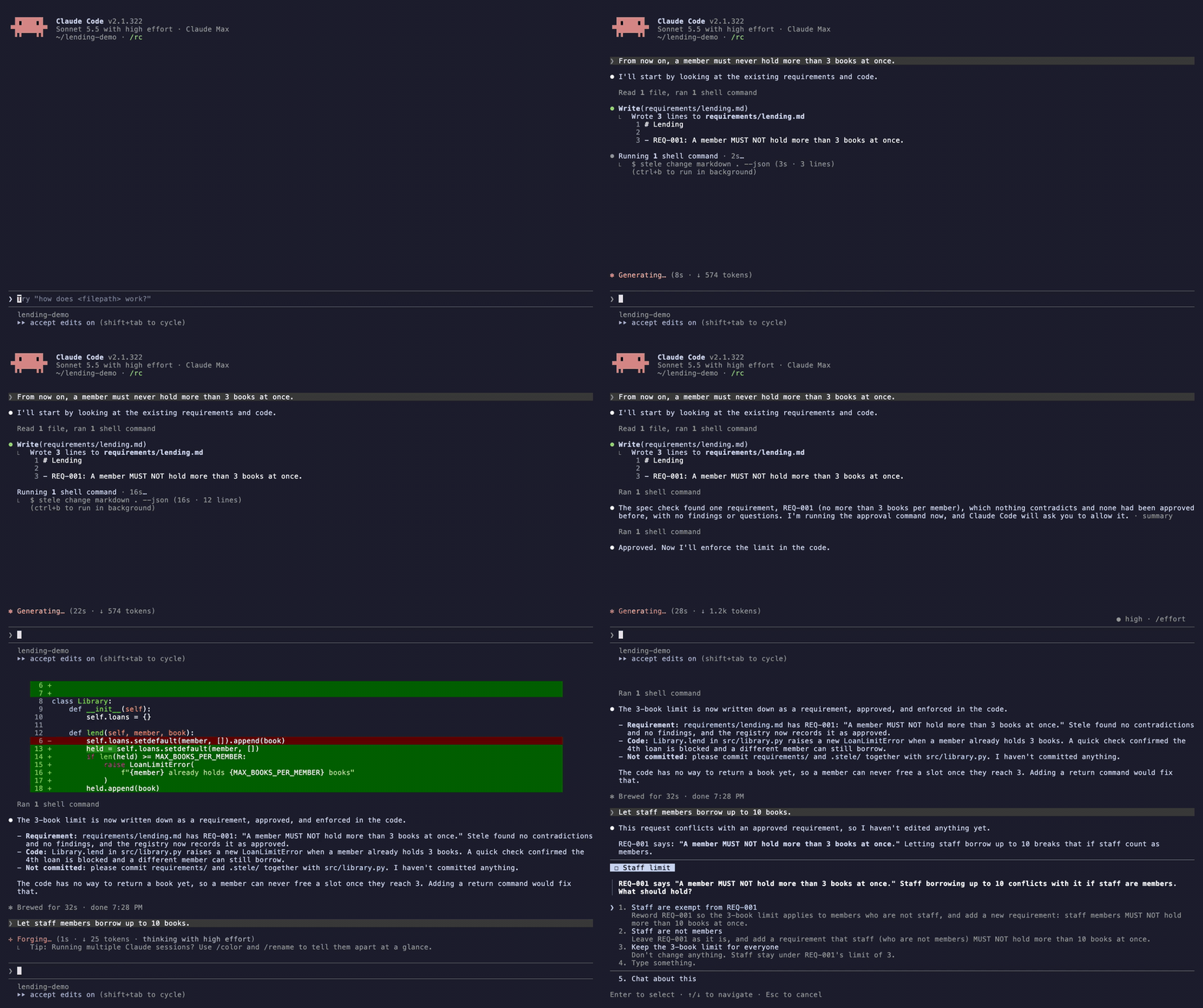
A real Claude Code session on a small example project, with the waiting cut.
Preview. Stele is open source and works with Claude Code. The commands work end to end on real repositories. Measured accuracy is uneven, and stated below.
Two commands
cd your-repo
stele init
stele init finds your spec format and writes Stele’s short instructions and
hooks for Claude Code into the repository. Commit what it writes, and every
teammate’s agent runs the same loop. Stele is one file with nothing else to
install: the Z3 solver is built into it.
After that you do not run Stele. The agent does.
What you see
- When you state a lasting rule (“from now on”, “never”, a limit, a default), the agent writes it down as one requirement and checks it before it builds. A one-off job is only a job, and Stele says nothing about it.
- When a requirement contradicts an approved one, you get a question in the requirement’s own words, with a concrete situation in which both cannot hold and what the code does today.
- Before you approve, you see how each requirement was read: clause by clause, with the rule that checks it in plain words (“Refuse “lend” on a tool when the number of tools the member holds is at least 3”), or that nothing checks it. A sentence the reading left out is listed too.
- When a change is ready, you approve it in one act. Claude Code asks you to allow the one command that records the approval, with Stele’s summary in the prompt. Allowing it is the approval; denying it records nothing.
- When you ask for a change, the agent gets the approved requirements the request touches. Its plan keeps them, or it quotes the one in the way and asks you.
- When you commit, a pre-commit hook blocks specs and approved
requirements that disagree, and says what to run. It also blocks what it
cannot check: a registry or
stele.yamlthat does not load, a registry emptied or removed, a vocabulary change that alters what approved rules mean.
The approval prompt holds back an agent that would approve for you by mistake. It is not a security boundary.
The specs you already have
| Your project writes | Stele reads |
|---|---|
| Spec Kit | specs/ |
| OpenSpec | openspec/changes/ and the merged specs |
| Kiro | .kiro/specs/ |
| Plain Markdown | specs/, docs/specs/ or docs/, or the folder you name: every statement with a MUST, MUST NOT, SHOULD or MAY |
| Nothing yet | stele init sets up requirements/, and the agent keeps it: one line for each requirement, with an ID |
Specs kept somewhere else in the repository are one setting away. Name the
folder in stele.yaml, and Stele reads every Markdown file under it:
specs:
  root: design/rules
  format: markdown
  snapshot: .stele/accepted-statements.yaml
A project has one spec folder, and it is inside the repository. Stele does not read specs spread over several folders with no common parent, or kept in a wiki or a shared document.
On a project with specs already, the first commit that touches them says how to adopt: Stele reads every requirement once and asks you about the contradictions a reader of your specs would also find. Clashes only its own rules show, it settles itself and lists in the report.
- Start small if the project is large. On more than a hundred
requirements,
stele adoptfirst offers the specs with their sizes and reads nothing until you pick.stele adopt --spec <name>reads only the specs you name, and a later run reads more, checked against what you approved. - You do not have to settle everything to finish. Specs written over years
disagree in places. For each contradiction you can say that one requirement
is the exception to the other, which Stele recommends when one is a check or
an error case, or decide later: the contradiction is recorded as open,
stele checklists it, and no new one may join it. Neither answer edits your specs. - Some contradictions are listed as possible, not proved. Stele also has the model read your specs’ texts for contradictions. One its rules do not prove is read again; if they still do not, it is listed before the approval in one sentence, so that finding it does not depend on one reading. It needs no answer: reword a requirement if it is real, or approve knowing of it.
- Not everything can be checked. Expect a quarter to a third of the requirements to be recorded unchecked: those about how the code is built, about the process, or matters of judgment. The summary gives the count.
How it works
- Read. Each requirement becomes a rule over one vocabulary shared by the whole project, so one fact has one name. A requirement Stele cannot express is reported, not dropped.
- Check the reading. Stele asks whether each rule covers every clause of its requirement and no more, reads a misread requirement once more, and names what it could not cover.
- Find contradictions. A model proposes them. The Z3 solver confirms the ones it can express, each with a situation in which the rules cannot all hold.
- Ask the owner. Each contradiction is settled against the code first, then put to you as a question. Your answers are saved as decisions and lessons, committed with the specs.
- Guard. Every later change is checked against every approved requirement, reading only what the change adds or edits. The hooks that inform the agent call no model.
What stays on your machine
The approved requirements, your approvals and the lessons live in the
registry, committed with your specs. While a change is open, Stele keeps its
readings and your answers in .stele/change/, which is never committed and is
removed when you approve. It keeps no copy of its prompts or of the model’s
replies, except the calls of a reading that failed, until that change is
approved. What it reads from your project reaches the model marked as
material, never as instructions. --max-cost limits what a whole check may
spend.
With Shale and Prism
Stele stands alone. It is also one of three Provasign tools, each answering a question the diff cannot.
- Shale records what the agent did. Stele commits a small card of what a change does to the requirements, and Shale shows it on the pull request beside the session. In a project with no spec documents, the requests an agent declares with Shale can be kept as the requirements Stele checks.
- Prism shows the agent every place a change reaches. Stele says what must stay true; Prism says what must change with it.
What to expect
Measured on case studies and held-out sets. These are single runs on small labelled sets, and a rerun can read a requirement differently.
- On real projects. We read the specs of 13 open-source projects built with Spec Kit, OpenSpec and Kiro. Every one has requirements that contradict each other, confirmed by hand against the spec text. In three, one for each tool, we traced the contradictions to the code and to real bugs. Stele shows its owner 9 of those 10 contradictions before anything is approved; the tenth rests on a design note, not on a requirement. All nine came from its review of the texts and were listed as possible; the solver proved none in these runs.
- On labelled sets. On two independently labelled sets of 109 and 45 requirements, an adoption showed 20 of 20 and 10 of 13 known contradictions: 17 and 7 as solver-checked conflicts put to the owner, the rest listed as possible.
- Reading requirements into rules is the weak stage. On a blind-graded sample of 20 statements, 5 rules said exactly what their statement said, none misread it, and most of the rest said less. That is why you approve every reading, shown clause by clause with what checks it.
- Cost. About 1.5 cents a requirement for short requirements on Sonnet,
the model
stele initnames: eight requirements for $0.13, 109 for about $1.50. Long requirements with scenarios cost more: the first check of a 179-requirement project cost $3.96 and took about ten minutes. The hooks call no model: a request about specified behaviour adds about 400 to 600 tokens of approved requirements to the agent’s context, in under 25 ms.
A conflict reported as proved holds for the rules as approved. “No conflict” is a statement about those rules, within stated bounds, not about the prose. Stele does not prove that the code implements the spec. What a verdict means states the semantics.
How it compares
Checked against each tool’s public documentation on 2026-11-09. Where a column says no, that is what the documentation showed, not a proof of absence.
| Tool | Finds contradicting requirements | Across how much | Checked by | Remembers what was decided |
|---|---|---|---|---|
| Kiro Requirements Analysis | Yes, as two-option questions | One spec’s requirements file | A model and a solver | The answer rewrites that file |
Spec Kit analyze and clarify |
As one item of a consistency pass | One feature and the constitution | A model | In that feature’s spec |
OpenSpec validate |
No | Structure of one change | Rules of form | No |
| Stele | Yes, as questions with an example and what the code does | Every approved requirement in the repository, whenever it was written | A model proposes, a solver confirms | A registry of approved readings, decisions and lessons, in git |
Kiro does the closest thing, inside its own IDE and for one spec at a time, and it also derives property-based tests, which Stele does not. What Stele adds is the span and the memory.
Not yet
- Coding agents other than Claude Code.
- Running the gate in GitHub Actions without setting it up yourself.
- Generating tests from the rules, or checking that a code change keeps the rules it touches.
- Specs in more than one folder, or outside the repository (a wiki, a shared document).
Try it
Try Stele takes about an hour on a project of your own and says what to send back. The source, the docs and the issue tracker are at github.com/provasign/stele.